This guide explains how to enroll a trust in EFTPS. EFTPS requires trusts to enroll under the Business category.
NOTE: The Electronic Federal Tax Payment System (EFTPS) is provided free by the U.S. Department of the Treasury. After you have enrolled and received your credentials, you can pay the IRS any tax due using this system.
For new enrollments, it may take 5 to 7 business days to receive your PIN by mail before you are able to schedule a payment, so please plan accordingly. Enrollment is also required in order to make one-time payments, store payment information for future use, and access prior year tax return details, payment history, and other account information.
NOTE: Your tax payment is due regardless of the website’s availability. You can always make a tax payment by calling the EFTPS voice response system at 1-800-555-3453. Follow the prompts to make your payment.
What You Will Need
- Employer Identification Number (EIN)
- Trust name as it appears to the IRS
- Trustee phone number and email address
- Trustee mailing address (and country, if outside the United States)
- US. bank routing number, account number, and account type (Checking or Savings)
Step 1. Go to EFTPS and Start Enrollment
- Go to https://www.eftps.gov/eftps/
- Select Enroll
- Accept the Privacy Act and Paperwork Reduction Act
- Choose Business as the entity type
NOTE: Even though you are enrolling a trust, EFTPS requires the Business category.
Step 2. Enter Enrollment Information
Business Information
- Enter the EIN, trust name, and trustee phone number

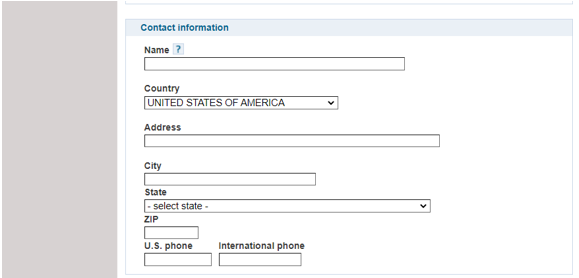
Contact Information
- Enter the trustee’s name, country, address, and U.S. phone number and/or international phone number
 Financial Information
- Under Payment Options, select Authorize a transaction yourself and enter the bank information (routing number, account number, and account type)
- Optional: You may choose Have your Financial Institution initiate your transaction. Confirm availability and any fees with your bank before selecting this option.
 Step 3. Review and submit
- Select Review
- Confirm the business, contact, and financial payment information
- Under Authorization, review the authorization agreement
- Complete the electronic signature, enter the EIN, and accept the Authorization Agreement
- Select Complete
PIN by mail
- EFTPS will mail your 4-digit PIN in 5–7 business days. You can schedule payments after you receive the PIN.
- If you create a new enrollment online, you will still receive the PIN by mail in 5–7 business days before payments can be scheduled.
Recommended
- Enter an email address to receive notifications, then select Continue.
- Print the Enrollment Confirmation and/or confirm that you received an email confirmation.
Step 4. Activate your enrollment
- After you receive your PIN, call 800-555-3453 to activate your enrollment.
- If you cannot locate your 4-digit PIN and have not yet completed enrollment, call 888-434-7338 to obtain your PIN.